


KY3 Weather
4.63.41K Reviews
App Specs
- Version
- 6.2.512
- Updated On
- License
- Free
- Downloads
- 500,000+
- Developer
- Gray Media
- Categories
- Weather
- Platform
- Android
Screenshots
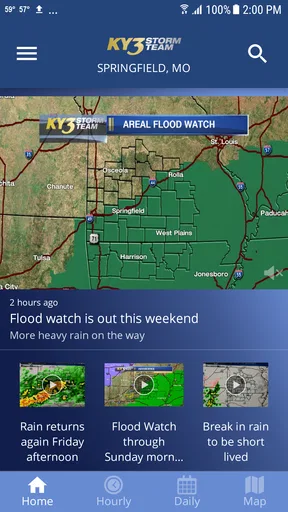
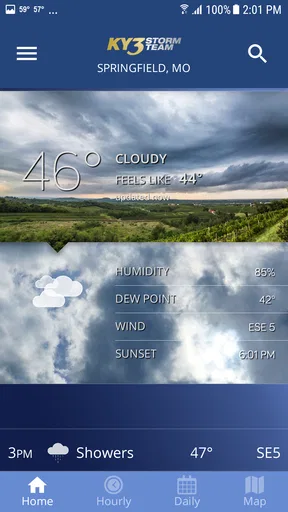
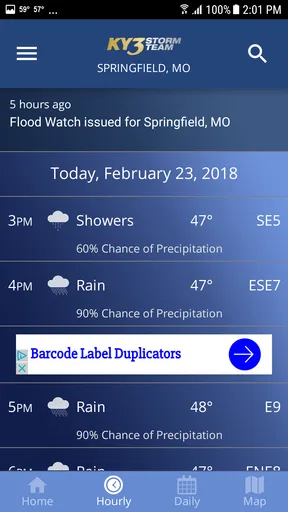
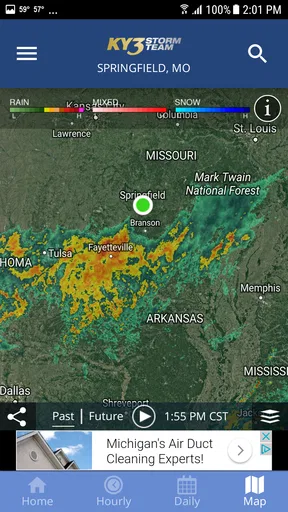
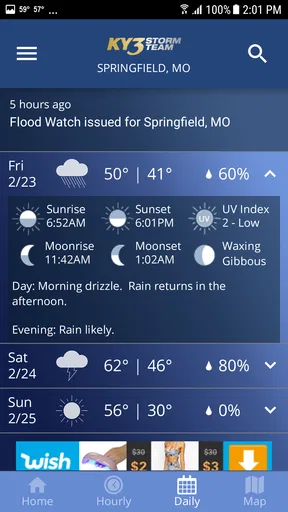
 Analysis by AppCompare
Weather apps are most useful when they help me make a decision quickly, not when they simply fill a screen with maps and numbers. KY3 Weather takes that practical role for people who want weather information connected to the KY3 Storm Team, and my experience with it is strongest when I have a reliable mobile connection and need a local update without digging through a general-purpose weather service. It is a free weather app from Gray Media, rated for Everyone, and its audience has already grown beyond a small local experiment, with more than half a million installs.
I found the app easiest to appreciate in ordinary situations: checking conditions before leaving for work, deciding whether a child needs a rain jacket, or watching the forecast before driving across town. It is not trying to replace every weather tool on a phone. Instead, it feels designed around the habit of opening a familiar local source and checking what may affect the next few hours. That focus is useful, although it also means people looking for a highly customizable global weather dashboard may find the experience narrower than expected.
How KY3 Weather feels when connectivity matters
When I rely on KY3 Weather away from home, I treat a successful refresh as part of the decision, not a small technical detail. This section looks at how connection quality can affect confidence, timing, and the way I prepare before heading somewhere with weaker service. A simple check before departure can also make the next step less rushed.
The app is most valuable during connected, time-sensitive moments
The central strength of KY3 Weather is tied to how quickly current information can reach the phone. Weather changes are exactly the kind of information that loses value when it is old, so I pay attention to the moment when the app is refreshing rather than treating it like a static reference book. With a working connection, opening it before a trip or outdoor plan gives me a more useful starting point than relying on yesterday’s forecast or a glance out the window.
That network dependence is not a flaw unique to this app; it is part of using current weather information on a mobile device. Still, it shapes the experience. If I am standing in a parking lot with weak reception, the app is less reassuring than it is at home on a stable connection. I would not make it my only preparation for a long drive through areas where service may be unreliable. My practical approach is to check conditions before leaving, especially when storms are possible, and then avoid assuming that every later refresh will arrive instantly.
For a local weather app, the connection also affects trust. I want to know that what I am seeing is current enough to guide a decision. A forecast that loads smoothly but is not refreshed is less useful than a slightly less polished screen with timely information. KY3 Weather works best when I treat it as a live information window rather than a permanent record stored on the phone.
A realistic morning routine
One everyday use case is a rushed weekday morning. I open the app while getting ready, check the current conditions, and then look ahead before choosing clothes or deciding whether to leave earlier. If rain or severe weather is a concern, I return to the app just before walking to the car. That second check matters because weather decisions are often about timing, not just the broad forecast for the whole day.
Worth Reading Before You Choose

EA SPORTS FC Mobile 26 Is a Bigger Football Game, but It Takes Time

Flipboard Shows What News Apps Must Do Beyond the Feed

Switching to Android Auto Means Rethinking Your Driving Routine

Google Calendar Makes a Crowded Week Easier to Manage

Ludo King Makes the Most of the Minutes Between Plans

Baby Panda World Brings Quick Play to Modern Phones, but Its Game Library Feels Busy
The app is also helpful when plans involve several people. Before meeting friends at an outdoor location, I can share a quick weather impression verbally instead of asking everyone to compare different services. A local source can feel more relevant in that situation than a generic international weather app, particularly for users who already follow KY3’s coverage and recognize the Storm Team as their familiar reference point.
There is a trade-off here. A local app may be more comfortable for regional decisions, but it is not automatically the best tool for every destination. If I am planning a trip far away, I would compare it with a broader weather service that is built around multiple locations and travel planning. KY3 Weather makes more sense as a dependable local companion than as my single weather authority everywhere I go.
What changes when I use it on the move
On a phone, the app fits naturally into short checks. I do not need to sit down and study weather for ten minutes before deciding whether to take an umbrella. The value comes from opening it at the right moment, reading the information I need, and putting the phone away. That makes it suitable for commuters, parents, outdoor workers, and anyone who wants a local check without turning weather into a major task.
Mobile use also introduces small points of friction. A bright outdoor screen, one-handed operation, and limited attention can make dense weather information harder to interpret than it is at home. I prefer to check the app before I start driving rather than trying to read it from behind the wheel. If a forecast could affect a journey, I make the decision while stationary and treat the phone as a planning aid, not a live distraction.
For outdoor activities, I use a two-stage workflow. First, I check the broader outlook before committing to the plan. Second, I check again shortly before leaving. This is more useful than repeatedly refreshing without a purpose, and it reduces the chance that I will mistake an earlier view for a current one. The important habit is timing the check, not simply checking more often.
Connectivity can shape confidence as much as convenience
When the app loads normally, the experience feels straightforward: open, inspect, decide. When the connection is slow, the same task can become uncertain because I have to wonder whether I am waiting for new information or looking at what was already available. That distinction matters during fast-changing conditions. I would rather pause and verify the information than assume that a delayed screen represents the latest situation.
This is where KY3 Weather differs from a printed forecast or a basic clock widget. Its usefulness depends on communication between the phone and the service behind the app. That gives it the advantage of being relevant to changing conditions, but it also means the phone signal becomes part of the weather experience. Users who regularly travel through poor coverage should build a backup habit, such as checking before departure and keeping other sensible travel preparations in place.
Handling weak service, interruptions, and recovery
When a weather app does not respond immediately, I do not keep tapping the same control. I first check whether other internet-dependent apps are also slow. If the problem appears broader, I wait until the connection improves. If only KY3 Weather seems stuck, I close and reopen it, then give the refresh a moment rather than judging the entire app from one delayed attempt.
That recovery routine is simple, but it prevents a common mistake: treating a temporary connection problem as proof that the forecast itself is wrong. A weather app cannot provide much current value if the phone cannot reach it. I also avoid making urgent decisions from a screen that has not clearly updated. In uncertain conditions, I prefer a fresh check before leaving and a cautious plan if the connection remains unreliable.
Another useful practice is to open the app before entering a weak-signal area. For example, if I am heading into the countryside, I check the expected conditions while I still have dependable service. I do not interpret that as a guarantee that the information will remain current throughout the trip; it is simply better preparation than waiting until the phone is struggling to connect.
Recovery is also about expectations. I would not choose this app for a workflow that requires uninterrupted monitoring while moving between networks. It is better suited to deliberate checks at home, at work, or before an outing. That limitation does not cancel its value, but it defines the kind of user experience it can realistically provide.
Using it without wasting mobile data
Weather checking does not need to become a heavy-data habit. I normally open KY3 Weather when I have a clear question: Should I bring rain gear? Is the temperature changing enough to alter my plans? Is it worth delaying an outdoor activity? That focused approach is more efficient than leaving the app open and refreshing repeatedly throughout the day.
When I am on mobile data, I avoid unnecessary repeated loading, especially if I have already made the decision I needed to make. I check once for planning and again only when conditions or timing genuinely matter. This is a practical compromise for users with limited data allowances, and it also keeps the app from becoming a source of needless notifications or attention, depending on how the phone is configured.
I also prefer using a stable connection for longer browsing sessions. If I want to examine weather information at leisure, I do that at home or on a trusted network. On the move, I keep the interaction brief. The app is most efficient when used as a decision tool rather than as an endlessly refreshing screen.
There is a subtle benefit to this approach: it encourages better judgment. A forecast is guidance, not a personal guarantee for every street or minute. By checking the app at meaningful points and combining it with what I can observe around me, I get more value than I would from treating a single forecast view as absolute.
What the app does well for local users
KY3 Weather’s identity is its local connection. Gray Media develops the app, and the KY3 Storm Team name gives it a clear regional purpose. That matters to people who already want weather information from a familiar local outlet rather than an anonymous worldwide platform. The app’s average rating is 4.6 from around twelve thousand ratings, which suggests a strong level of user satisfaction, while its roughly three thousand four hundred written reviews indicate that many people have taken the time to describe their experience.
I would not treat those figures as a substitute for personal testing, but they do match the app’s general appeal: it is accessible, focused, and easy to understand as a local weather companion. The free price removes the biggest barrier to trying it, and the Everyone age rating makes it suitable for a household where different family members may need to check conditions.
The current release is version 6.2.512, and the app supports Android 9 or later. That operating-system requirement is worth checking before installation, particularly on an older phone. A free app is not automatically available to every device, and compatibility can matter more than features when someone is using an aging handset as a backup or emergency phone.
Where a different weather app may be better
I would choose a broader weather service when I need extensive worldwide coverage, many saved destinations, specialized forecasting tools, or a very detailed comparison between providers. Those apps often make more sense for frequent travelers, weather enthusiasts, and users who want to customize nearly every part of the display.
I would also skip KY3 Weather if my main goal were a minimalist glance with no need to open a full app. A simple system widget may be faster for someone who only wants the current temperature. On the other hand, a widget can be too limited when I need context before making an outdoor decision. The right choice depends on whether I value a local, fuller check over the absolute fastest glance.
People who expect perfect performance in every coverage area should be realistic as well. Because the experience is shaped by the network, it is not the ideal sole resource for remote travel or situations where the phone may be disconnected. I see it as one part of sensible preparation, not a replacement for checking ahead, carrying appropriate clothing, or using caution during dangerous conditions.
Small habits that make the experience better
I get the most from KY3 Weather by using a few deliberate habits. I check before leaving rather than after I am already on the road, compare the timing of the forecast with the timing of my plans, and refresh only when a new decision depends on updated information. Those steps sound basic, but they address the main weakness of any connected weather app: information is only useful when it is current, reachable, and interpreted in context.
I also keep the app in a convenient place on my phone if weather affects my routine. That reduces the temptation to substitute a random search result when I need a quick local answer. If I am planning an outdoor event, I check earlier in the day and again near departure. If I am traveling beyond the app’s natural local focus, I add a broader service instead of expecting one regional tool to cover every need equally well.
For families, I would explain that the app is useful for preparation but not a reason to ignore changing surroundings. Children may need a different layer even when a forecast looks mild, and an outdoor plan may need flexibility when conditions shift. The app helps organize that decision; it does not remove the need for common sense.
My connectivity verdict
After using KY3 Weather as a local planning tool, I see it as a good fit for people who want a free, familiar weather app from Gray Media and who usually have dependable internet access when they check it. Its strongest moments come before a commute, a school run, or an outdoor plan, when a quick local update can change what I wear, when I leave, or whether I go at all.
The main limitation is equally clear: current information depends on the connection. I would not rely on it as the only source during a remote trip, and I would not keep refreshing it just to feel prepared. Checking ahead, allowing time for updates, and using a backup plan when service is poor are essential parts of using it well.
For Android users on version 9 or later, the free download and Everyone rating make trying it easy. The app has been available since September 22, 2011, and its current version shows that it remains an active option for people who want this style of local weather access. I recommend KY3 Weather to readers who value regional familiarity and quick mobile checks. I would point frequent travelers or advanced weather users toward a more expansive alternative, but for everyday local decisions, this app earns a place on my phone.
Pros
- Clear local forecasts for the KY3 viewing area
- Radar maps help track storms in real time
- Severe weather alerts can provide useful advance warning
- Hourly and extended forecasts are easy to check
- Weather videos and updates add local context
Cons
- Coverage may be less useful outside the KY3 broadcast region
- Frequent alerts can become distracting during active weather
- Some features may require location access to work properly
- Forecast accuracy can vary during rapidly changing conditions
- Advertising may take up screen space or interrupt browsing
FAQs for KY3 Weather
What is KY3 Weather, and what information does it provide?
KY3 Weather is a weather application focused on delivering forecasts and weather updates for the KY3 viewing area. After exploring the app, users can generally expect current conditions, hourly and daily forecasts, radar imagery, severe-weather information, alerts, and local meteorological news. The available information may vary by location, device settings, and the app version installed.
Does KY3 Weather provide severe weather alerts and notifications?
Yes, one of the app’s most useful features is its severe-weather coverage. KY3 Weather can provide warnings, watches, and other important notifications for selected locations, helping users stay informed during thunderstorms, tornado threats, flooding, winter weather, or extreme temperatures. Users should enable notifications and location permissions, because alerts may not work correctly if these settings are disabled.
Can I use KY3 Weather to check forecasts for locations outside the KY3 area?
KY3 Weather is primarily designed for viewers and residents in the KY3 coverage region, so its strongest local features are aimed at that audience. Depending on the version, you may be able to search for or save additional locations, but the level of local reporting and alert coverage can differ outside the main service area. Check the location search options before downloading if you travel frequently.
Does KY3 Weather require location access, and can I use it without sharing my location?
The app can usually provide basic weather information without continuous location access if you manually choose a city or ZIP code. However, location permission makes it easier to receive forecasts and alerts for your current area, especially while traveling. If privacy is a concern, select a limited or approximate-location option where available, or manage permissions through your Android or iOS settings after installation.
Is KY3 Weather free to download, and are there any limitations?
KY3 Weather is generally available as a free download, allowing users to access core forecasts, radar, local weather information, and alerts without purchasing a subscription. Depending on the platform and app version, it may contain advertising or offer a different feature set than the KY3 website or television broadcasts. Before installing, review the store listing for current permissions, compatibility, privacy details, and in-app purchase information.


